Your roadmap, live for the world to see
Give your users a real-time window into what you're working on. The public portal surfaces the tasks you choose to share — by status, category, or release — without exposing anything internal.
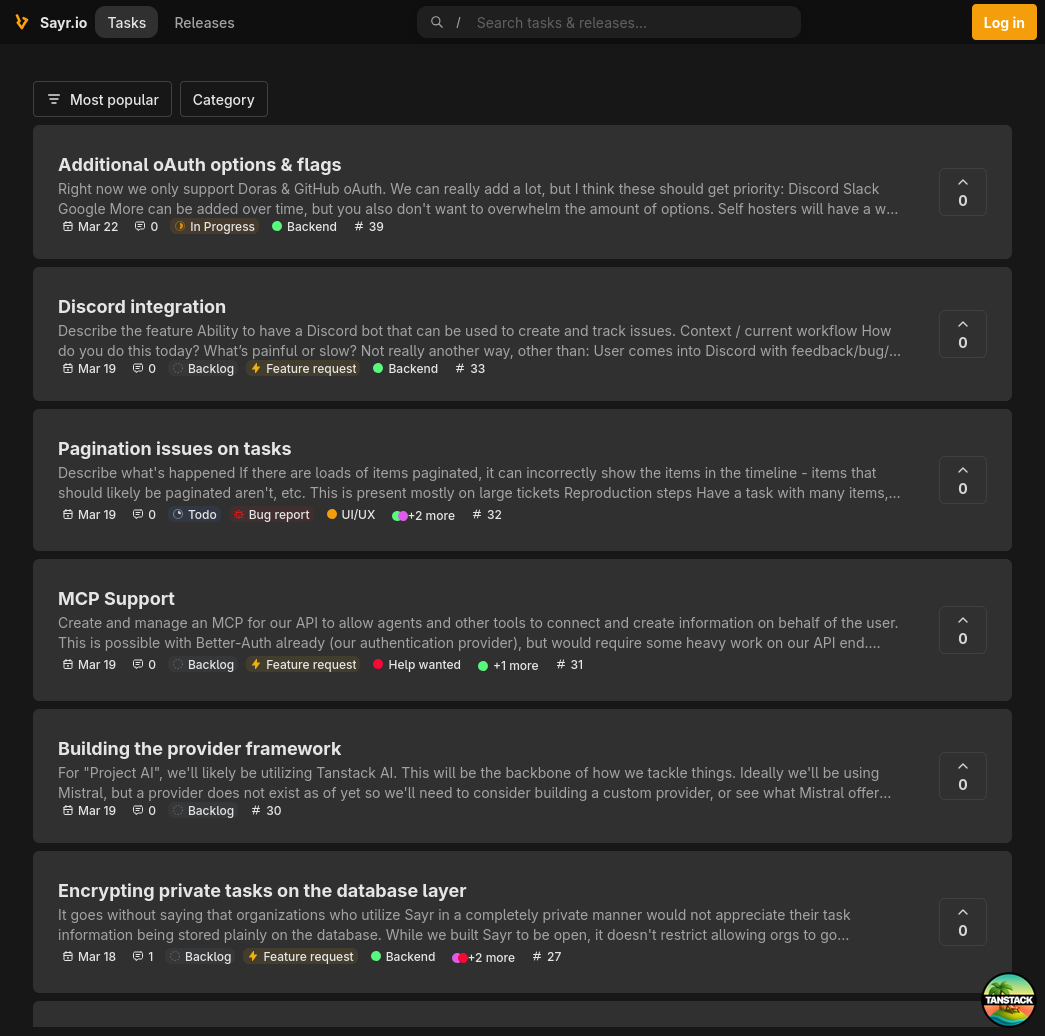
What is the public portal?
Every Sayr organization gets a live public board hosted at org.sayr.io. It's a standalone page your users can visit without needing an account — they see exactly the tasks you've chosen to make public, nothing more.
It's not a status page. It's not a changelog. It's your actual task board, filtered to what's appropriate for external eyes.
Live example
A software team might share their in-progress feature work and open bug reports publicly while keeping internal sprint planning tasks, architectural decisions, and staff-only discussions completely hidden.
How it works
Your team manages tasks internally
Create tasks, set priorities, assign work, add internal comments, link GitHub branches — your full workflow, exactly as you'd expect from a project management tool.
Mark tasks public when ready
Each task has a visibility toggle. Set it to public and it immediately appears on your portal. Set it back to private and it disappears instantly. No publishing workflow, no delay.
Users engage directly
Visitors to your portal can browse tasks by category, search, sort by votes or recency, submit new requests, vote on existing ones, and leave public comments — all in real time.
What users see
The public portal is a clean, minimal board with everything stripped back to what matters for external visitors:
- Category sidebar - users filter to the area they care about (e.g. "Mobile", "API", "Dashboard")
- Task cards - title, status, priority, vote count, and comment count
- Task detail pages - full description, public comments, timeline of public status changes
- Submit feedback - users can file bug reports or feature requests, either freeform or from one of your templates
Everything updates in real time via Server‑Sent Events (SSE). If you change a task's status while a user is viewing the portal, their page updates without a reload.
Customisation
Your portal reflects your organization's branding. You can set a banner image, logo, organization name, and description — all from your organization settings. The subdomain is your org's slug, which you control.
Related Features
Ready to get started?
Join teams using Sayr to manage work internally and share progress with their users.